Set a late pickup fee
Choose the time families pick up by and what each late block of minutes costs. Farlow works the fee out from check-out times and puts it on the next invoice.
Where: Billing > Plans and setup > Late pickup
On the web, Billing
Billing is open to the director and the center's bookkeeper. The fee is read from check-out times, so children need to be checked out in the app.
- 1.
Open Billing and choose the Plans and setup tab.
- 2.
Find the Late pickup card. Until you set a fee it says No late-pickup fee configured, so none is ever charged.
- 3.
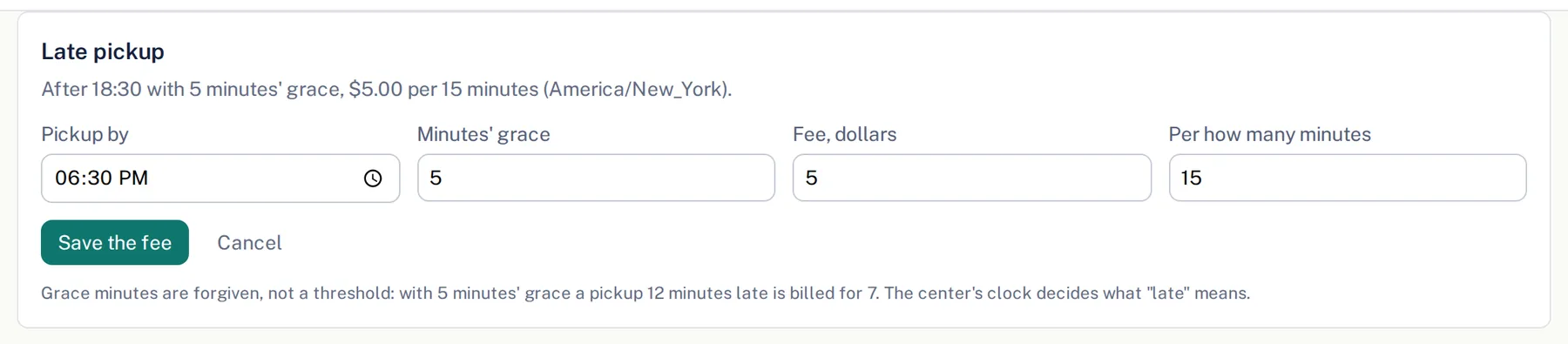
Tap Set a fee. Fill in Pickup by (the time a pickup becomes late), Minutes' grace, Fee, dollars and Per how many minutes.
- 4.
Tap Save the fee. The card now states the rule in one line, with your center's time zone.
- 5.
To change it later, tap Change the fee. To stop charging, tap Turn it off.
The fee is worked out when invoices are drawn, from the time each child was checked out. Each late pickup becomes its own line on the family's invoice with the date and the minutes late. If a check-out time was wrong, correct it before the invoice is drawn.
Questions
- How do the grace minutes work?
- They are forgiven, not a threshold. With 5 minutes' grace, a pickup 12 minutes late is charged for 7.
- Is a part of a block charged?
- Yes. Every block that has started counts. At $5 per 15 minutes, 7 chargeable minutes cost $5 and 16 cost $10.
- We sell extended care too. Is the same time charged twice?
- No. When extended care runs later than your pickup time, the fee starts where extended care ends, and the card says so.