Tell the center your child is not coming in
It goes straight onto the room's list, so nobody at the center has to read a message and remember it.
Where: Home > Not coming in? > Tell the center
On the phone, Home
- 1.
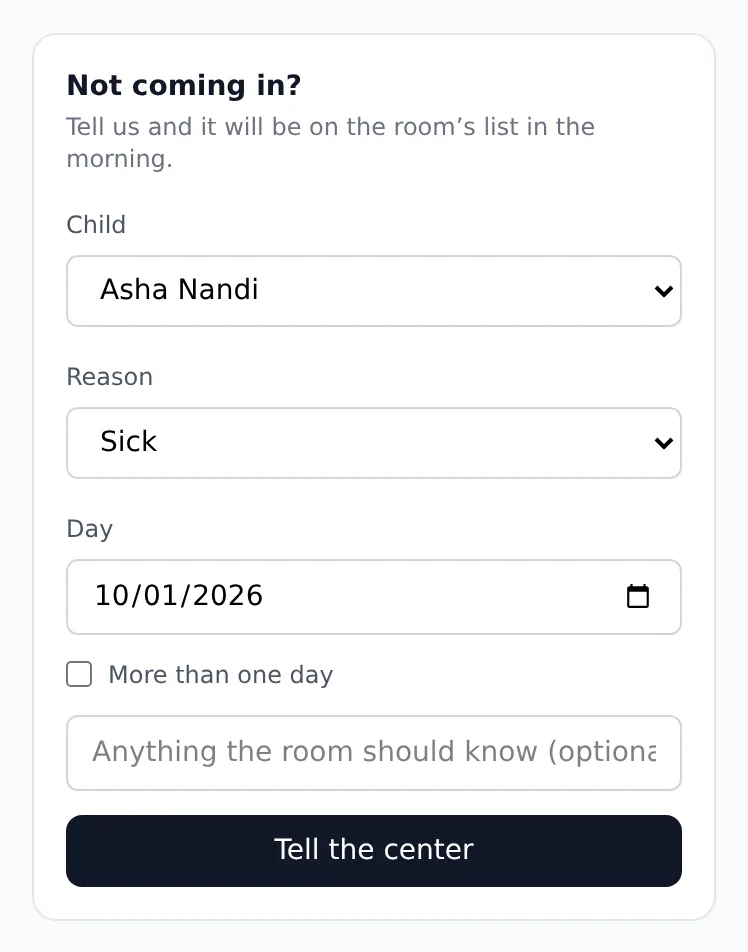
Open Home. The Not coming in? card is on it.
- 2.
Pick the child under Child and why under Reason.
- 3.
Day starts at today. For a vacation or a longer illness, tick More than one day and set First day and Last day.
- 4.
Add a note for the room if you like, and tap Tell the center.
The day then shows under Already told them. If your child comes in after all, tap Coming after all. Checking in at the door clears it on its own too.
Questions
- Can I report a day that has already passed?
- No. Today or a later day only.
- What if the center is closed on one of the days?
- That day is left out and the other days are recorded.
- How far ahead can I report?
- Up to 60 days in one go. For a longer stretch, report it in parts.