Book a conference time for your child
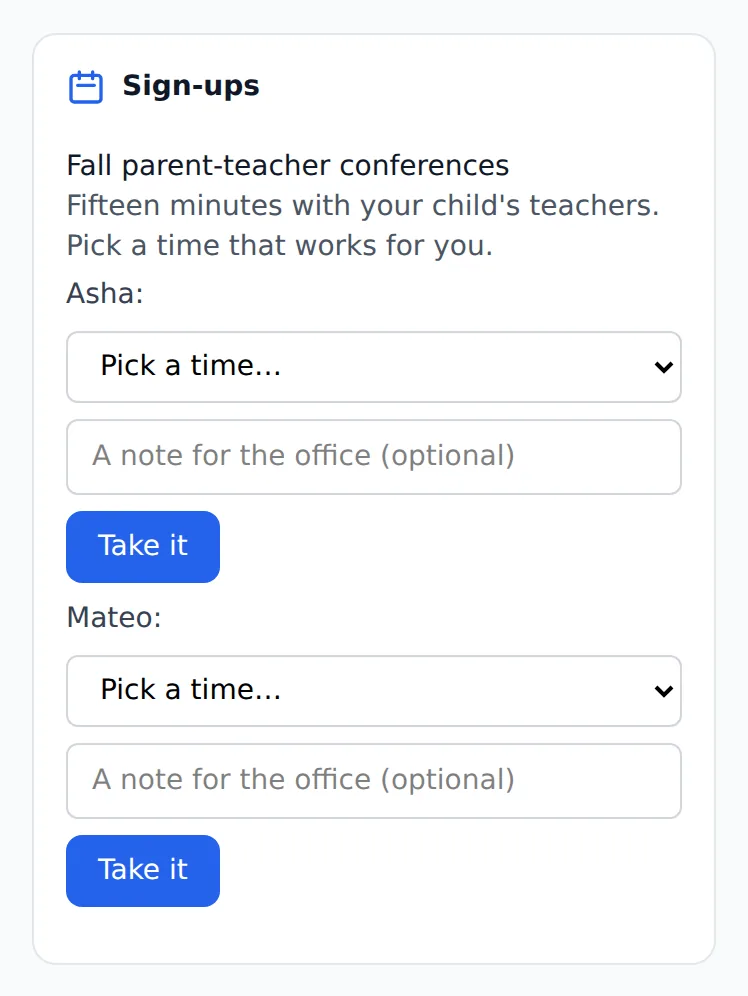
When your center opens a sign-up, it shows on your home screen with the times still free.
Where: Sign-ups on your home screen > Pick a time… > Take it
On the phone, Home
- 1.
Open your home screen and find the Sign-ups card. Each open sheet is listed with what the center wrote about it.
- 2.
Under your child's name, open Pick a time… and choose a time. Only times with a place left are offered.
- 3.
Add a note for the office if you like, then tap Take it.
- 4.
To change it, tap Give it back and pick another time.
With more than one child, each child has their own time. The center sees who took which time on its own list.
Questions
- What if every time is taken?
- The card says so. Ask the center whether it can add times.
- Can I change my time?
- Yes, while the sheet is open: give the time back, then take another.
- Do I need to tell the office I booked?
- No. The booking is on the center's list as soon as you take it.